Unlock For Us

Youtube Hack Code: Download and Save Youtube Videos using Any Browser (Firefox, Google Chrome, Opera and Safari)

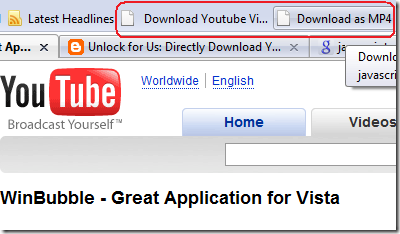
Yesterday, I wrote the hack that let's you download and save youtube videos in Google Chrome easily while playing the video. The Great thing, The hack Also works in Firefox and Safari Web Browser. How about in Opera?

opera

Yes It's Working!

FIREFOX: http://unlockforus.blogspot.com/2008/09/easily-download-and-save-youtube-videos.html

Firefox

SAFARI and Opera: http://unlockforus.blogspot.com/2008/09/how-to-download-and-save-youtube-videos.html

Bookmarks 

All of Them Works...

Wow... Thank you Youtube.com for adding the swfArgs[x] Code to All the Youtube Pages.

Proud to Say...I Unlock This First!


Read more...

Unlock For Us

Youtube Hack in Google Chrome, Download and Save Videos Easily

No more problems in Add-ons or extensions that slows you down or even there is no need to memorize the Youtube hack Code in Chrome. By applying the code to your Bookmarks. It will create a Download Button that will let you download youtube movies/videos easily.

saveyoutubebutton

Yes it's possible!

Read here


Read more...

Unlock For Us

WinGuggle: Backup your Product/License Key (CD-Key), Customize User and OEM Information easily

When you bought a new laptop especially for HP Compaq computers. The original installation CD is not included. This is also true on some second hand laptops of DELL, FUJITSU, IBM Thinkpad (Lenovo), ASUS, ACER and others.

Laptop/PC Recommendation:

Consider buying a laptop in which installation disc of Operating System, Software's and Drivers are included. If the disc is not included, Try to request from your Laptop Manufacturer.

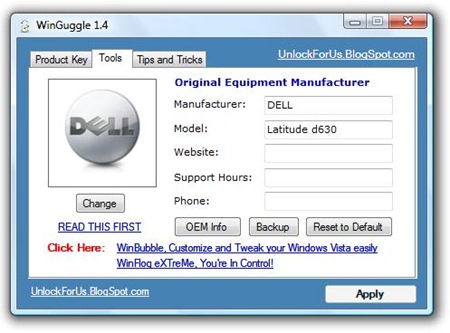
If you can't do anything about it. Get the Product Key using WinGuggle for future use. Download WinGuggle here via UnlockForUs

winguggle 

If your laptop crashes, full of virus and very slow. You need to re-install windows. That is when WinGuggle become useful.

Second Hand Laptops

When you bought a Second Hand Laptop and you want to change the User and Original Equipment Manufacturer information (Owner and Organization). WinGuggle is extremely useful. Great for Windows XP and Vista Users!

Tools

............

Great thing with WinGuggle, there's a link on How to customize the user and OEM information Manually.


Read more...

Unlock For Us

Unlocking Comodo Firewall in Windows Vista

thumbnail

The Free Comodo Firewall Pro is an Enterprise level Firewall security that secure your system against Internet attacks such as Trojan viruses and malicious programs, identity theft and offers host intrusion prevention which stops spywares and viruses from being installed (Same as UAC and Protected mode in Windows Vista). Both Internal and external protection from attacks are given for FREE. 

Comodo Firewall = UAC + Protected Mode + Windows Firewall + Semi-Antivirus, Semi Anti-Rootkit and Semi Anti-Spyware Style Detection 

But one thing I have noticed after using the firewall for a while, It is the most annoying firewall and protection that I encountered several times more than the UAC of Windows Vista. Also, due to advance detection capabilities, It blocks certain modules and functions that upon installation, sometimes after that,  the software doesn't function or work properly.

For Beginners and Intermediate users, I recommend to install your IMPORTANT or TRUSTED programs first before installing this software. It's performance is at its best but it's very difficult to use and you need to confirm everything.

I tried to experiment the firewall with my software's WinBubble, WinGuggle and Winflog Extreme. WinBubble 1.74 and WinGuggle is a registry based programs and did not gave any alarm at all. It means, it doesn't monitor the settings made in the registry. WinFlog Extreme add-on winflog.exe gave a general alarm. As the creator of the program, I will say that it gave a false alarm. I know the code and specifically, it only checks the mouse clicking, anymore than that, nothing.

For programmers, intermediate and advanced users this firewall is  amazing and recommended. It monitors everything including a simple command dialog controls (Open, Save, Browse and many more...)

Solution to the annoying pop-ups

Great Thing: After A day of use, Comodo Firewall Learns by itself...
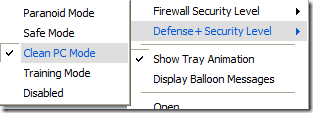
learning

This feature allows Comodo Firewall Pro to create a logs of all applications on a new computer and after several hours of use, a less annoying Security Defense Mechanism that is great while writing blogs and Software everyday.

Recommended Settings (Default)

Firewall Security Level: Safe Mode

Defense+Security Level: Clean PC Mode


Everything for FREE!

Download Now

For Complete Installation Guide... It will be published soon...


Read more...

Unlock For Us

Folder Security in Windows Vista

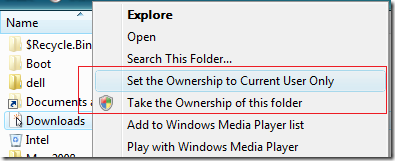
CurrentUserOnly

The new version of WinBubble has a new feature that adds "Set the Ownership to Current User Only" Right-click or context menu. The program is easy to use and you can now make a folder that only the current logon user (owner) can access the folder. Unless another administrator will add or take the ownership of the folder.

How about the Standard User Account? The account will not have an access to the folder unless he/she enter a correct password to the folder. Isn't that great?!

So, what's the importance of this?

  1. If the Standard User Account got infected by a virus, the folder that was "Set to Ownership" is protected against virus infection.
  2. Your folder is password protected and only administrator account can access it through adding permission or taking the ownership.
  3. WinBubble is safe to used because it has received many recognitions and awards all over the world.

How to Add a Password/Security to the folder?

1. Go to UnlockForUs Homepage and Download WinBubble

2. Open the program, click to check "Set the Ownership to Current User Only" and press ALT-A or just click the Apply Button.

Enjoy Learning Software's in Windows Vista!


Read more...


© Freeware For Us 2007-2021| Blogger| Google.com | License Agreement